Build livewire component to check ping with livewire

Build livewire component to check ping with livewire
The problem
You have to create a tool that measures the roundtrip network time to get from the client to the server, and back to the client.
To solve this problem without re-render or sending a long pooling request, I'll show how to build this tool with Livewire into the existent Laravel project.
We will start with the installation, then we setup the livewire and create our component to show the ping on-screen in milliseconds.
Solution
To get started, we need to install livewire in our existing application. To do this, go to the terminal and type the following command:
composer require livewire/livewire
We will wait a while until the installation is finished and later we will create our first LiveWire component and for that, we will execute the following instruction:
php artisan make:livewire ping-check
The command will create the following folders in our project, see the image below:
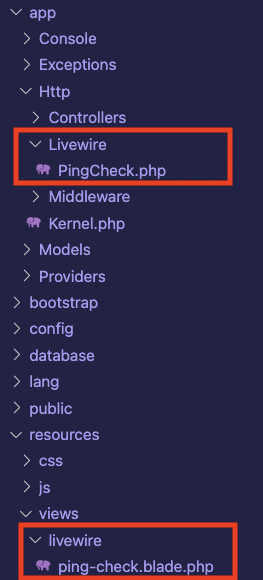
Now to use our component, let's insert the following code on the page that we want to show the result of the ping tool, which in the project I'm using is located in resources/views/welcome.blade.php:
@livewireStyles
<.../>
With these changes made, we can now work on our component's rendering logic. Open the project in your favorite editor/IDE and navigate to the app/Http/Livewire/PingCheck.php folder
The file should be like this:
namespace App\Http\Livewire;

use Livewire\Component;

class PingCheck extends Component
{
    public function render()
    {
        return view('livewire.ping-check');
    }
}
This file represents our component or livewire page and it will always have the render method where it is indicated which view will be displayed for this component.
Let's start building our method and the logic needed to display the ping value on our screen. With this, we will learn some interesting features available in Livewire.
namespace App\Http\Livewire;

use Livewire\Component;

class PingCheck extends Component
{
    public $ping_result;
    public $start_at;
    public function render()
    {
        $this->start_at = now();
        return view('livewire.ping-check');
    }
}
The first step to start building our component is to declare two variables $ping_result and $start_at, one responsible for showing the ping result in milliseconds on the screen and the other the exact moment when the count will start to calculate the difference in response time, respectively.
After that, we will create the method that will be called every second and will be responsible for updating the value of the result on the screen.
This method will be called ping_my_server and in it, we will use the native date method diffInMilliseconds to calculate the difference between $start_at and $end_at in milliseconds. Now we attribute the value of $diff to update $ping_result value.
namespace App\Http\Livewire;

use Livewire\Component;

class PingCheck extends Component
{
    public $ping_result;
    public $start_at;
    public function render()
    {
        $this->start_at = now();
        return view('livewire.ping-check');
    }

    public function ping_my_server()
    {
        $end_at = now();
        $diff = $end_at->diffInMilliseconds($this->start_at);

        $this->ping_result = $diff;
    }
}
Now that we have our method implemented, let's go to the component and see how we can show the ping is always up to date. We'll need to open the ping-check.blade.php file located in resources/views/livewire. Initially, we will only have a div with a text to be displayed, we can delete this code and we will start writing the code responsible for making the function call every second.
We will use livewire Polling which is a directive responsible for updating the component every 2s when used in a standard way wire:pool inside an HTML element, but in our case we want it to execute the function every second, so ourdiv` will look like this:
With that done, now we just need to show our component the updated ping result, and the entire component will look like this:
Ping in milliseconds: {{ $ping_result }}ms
All done, we are now able to finalize the component and we can use it in our project.